Registrations
Before a brand is sold in a state it’s registered there, and in many states the registration names the distributor. Registrations shows each state we read, day by day.
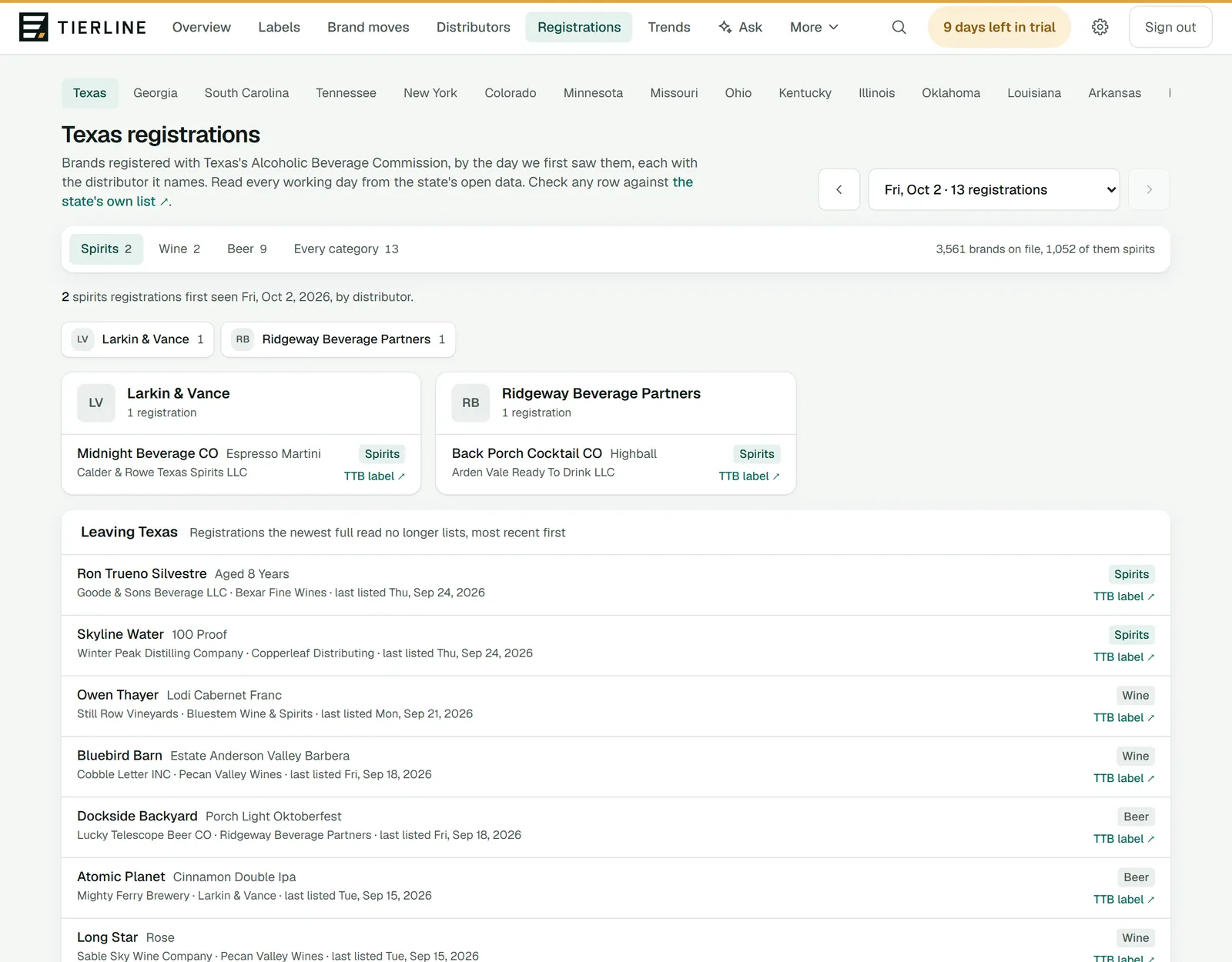
How to read it
- 1.
A tab for each state we read, your home states first.
- 2.
The day, newest first. The arrows and the menu go back.
- 3.
The category, with the day’s count of each.
- 4.
The distributors that day, each with its count. A chip jumps to its column.
- 5.
A column for each distributor, with its brands. Where the state names no distributor, the columns are by supplier instead. TTB label opens the label a registration names.
What to do here
See what a competitor registered
Choose your state, find the competitor’s chip and read its column.
Check a row at the source
The line under the title links to the state’s own list, where you can check any row.
Spot brands leaving
Leaving, further down, lists the registrations the state’s newest full read no longer has, most recent first.
Good to know
- In a control state the state itself is the wholesaler of spirits, so the page shows what it lists for its stores, by supplier. See license and control states.
- The first time we read a state, everything on its list is counted as on file; new registrations show by the day we see them after that.