Distributors and brand moves
Distributors puts every wholesaler named on a registration in one place, each as one company across its licenses and states. Brand moves, next to it in the menu, follows brands going from one wholesaler to another: one state’s wholesalers lane by lane, and who picked up whose brands across your states.
Every distributor
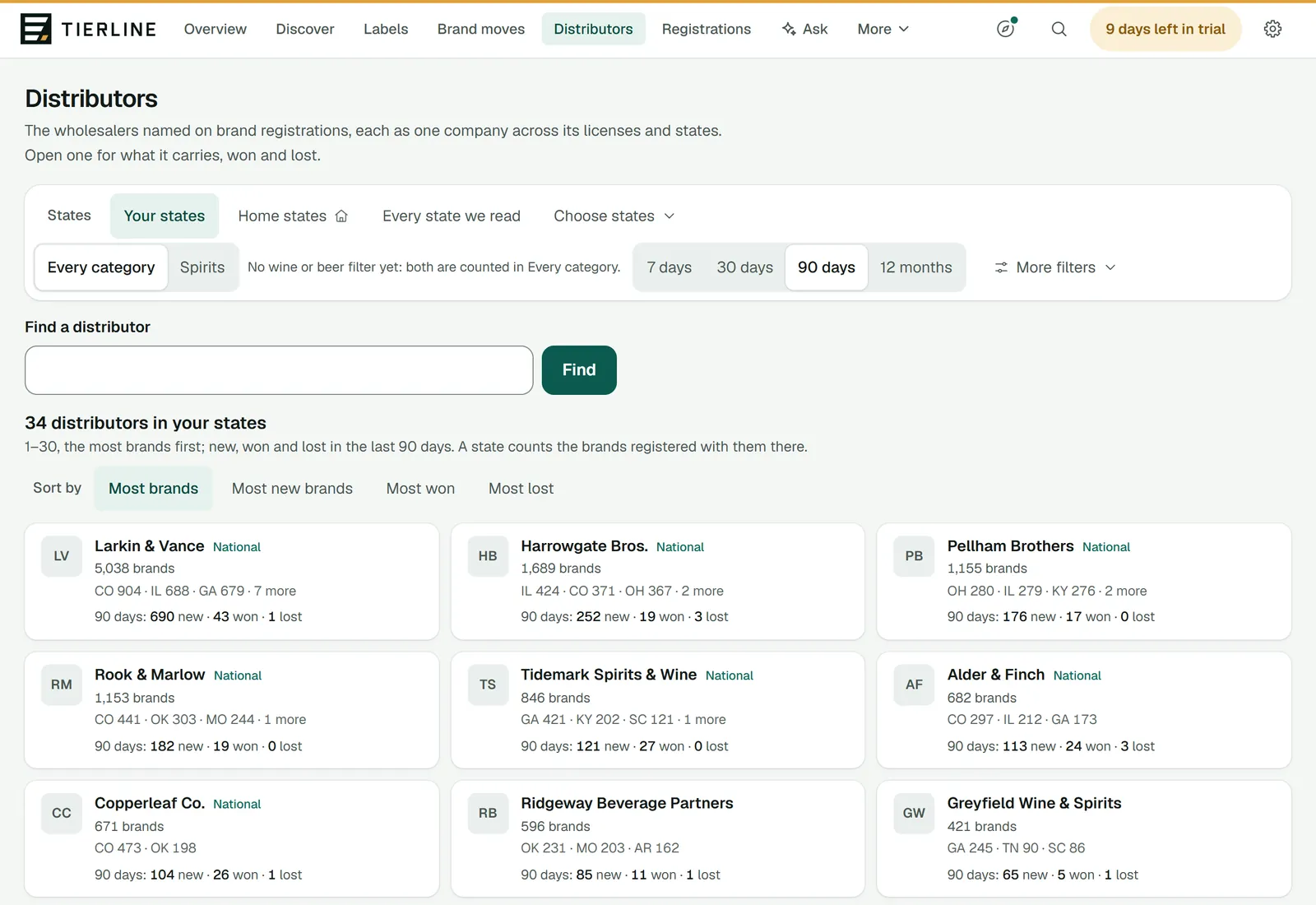
How to read it
- 1.
The states: Your states unless you choose your home states, Every state we read or any with Choose states. Then Every category or Spirits, and the period for the brands new to them, won and lost: 7, 30 or 90 days, or 12 months (it opens on 90 days). More filters has license or control states, the size, national distributors or the rest, and only those that picked up brands.
- 2.
Find a distributor by a word or two of its name; the other filters stay as they are.
- 3.
Sort by: the most brands first, or the most new brands, won or lost. Above it, how many distributors the states chosen name on their registrations; a state whose records name no distributor adds none, and the page says so.
- 4.
Each card: the company, National if it’s one of the national distributors, its brands in the states chosen and where they are, then its brands new to a state, won and lost in the period. It opens the company’s page.
A distributor’s page
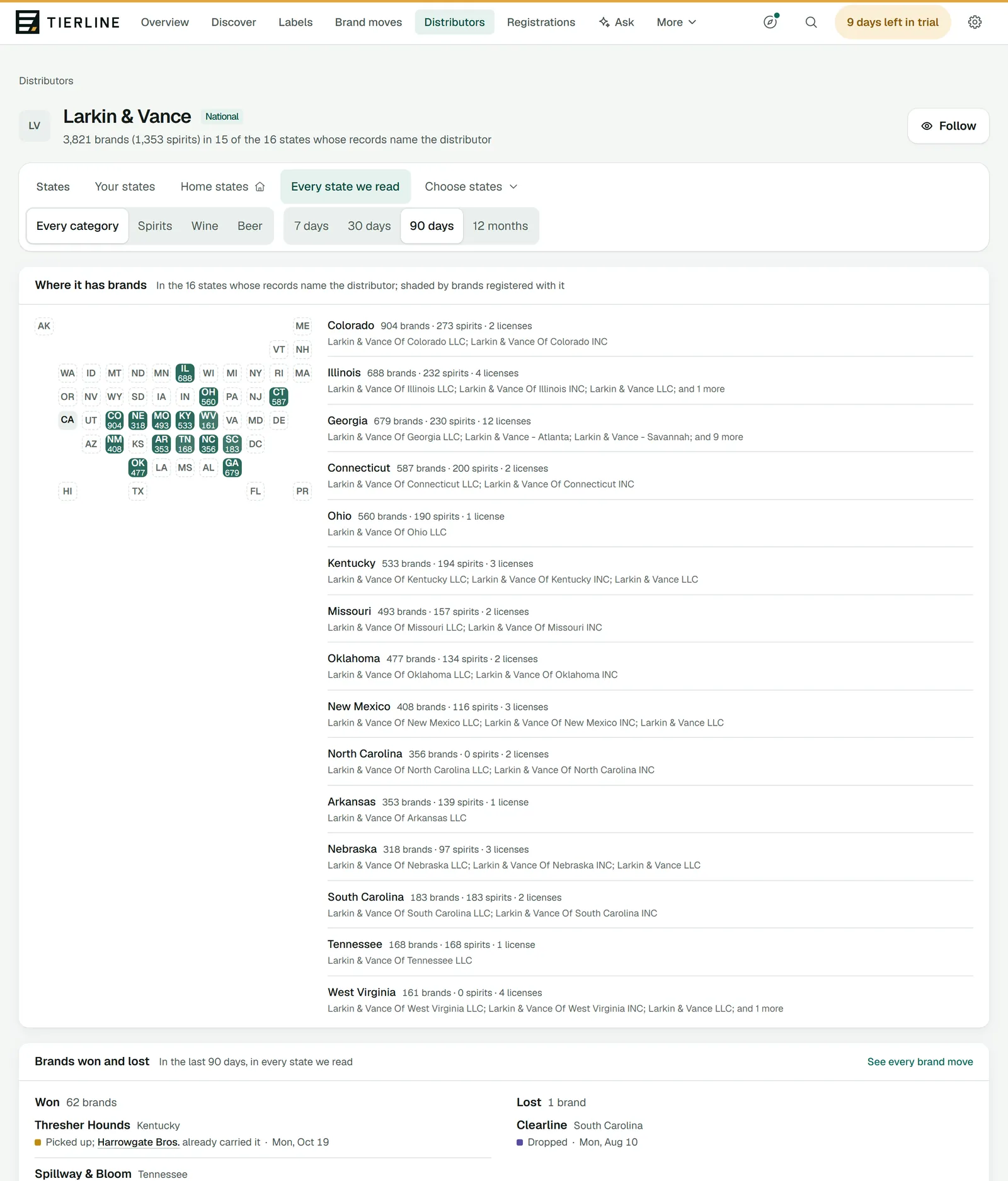
How to read it
- 1.
Follow adds it to your watchlist, so your briefing tells you when it picks up a brand.
- 2.
The states where it has brands, shaded by how many. A state opens its registrations.
- 3.
Each state: its brands, how many are spirits, its licenses and the names it holds them under.
- 4.
Brands won and lost: in every state we read over the last 90 days, unless you choose other states, a category or another period at the top.
Good to know
- Won: a brand it picked up that another wholesaler already carried, or one that moved to it. Lost: a brand that moved to another wholesaler, or one it stopped carrying. Another wholesaler picking up a brand it still carries isn’t a loss.
- Further down, New to a state lists the brands registered in a state for the first time with this company carrying them, each with its first day there.
- Under its name and on its map, its states are counted against the states whose records name the distributor: the only states where a distributor can be found.
Brand moves
Brand moves follows brands from one wholesaler to another, by the day the state recorded it: one state’s wholesalers lane by lane, so you can see who is taking on brands and where they come from, then who picked up whose brands across your states.
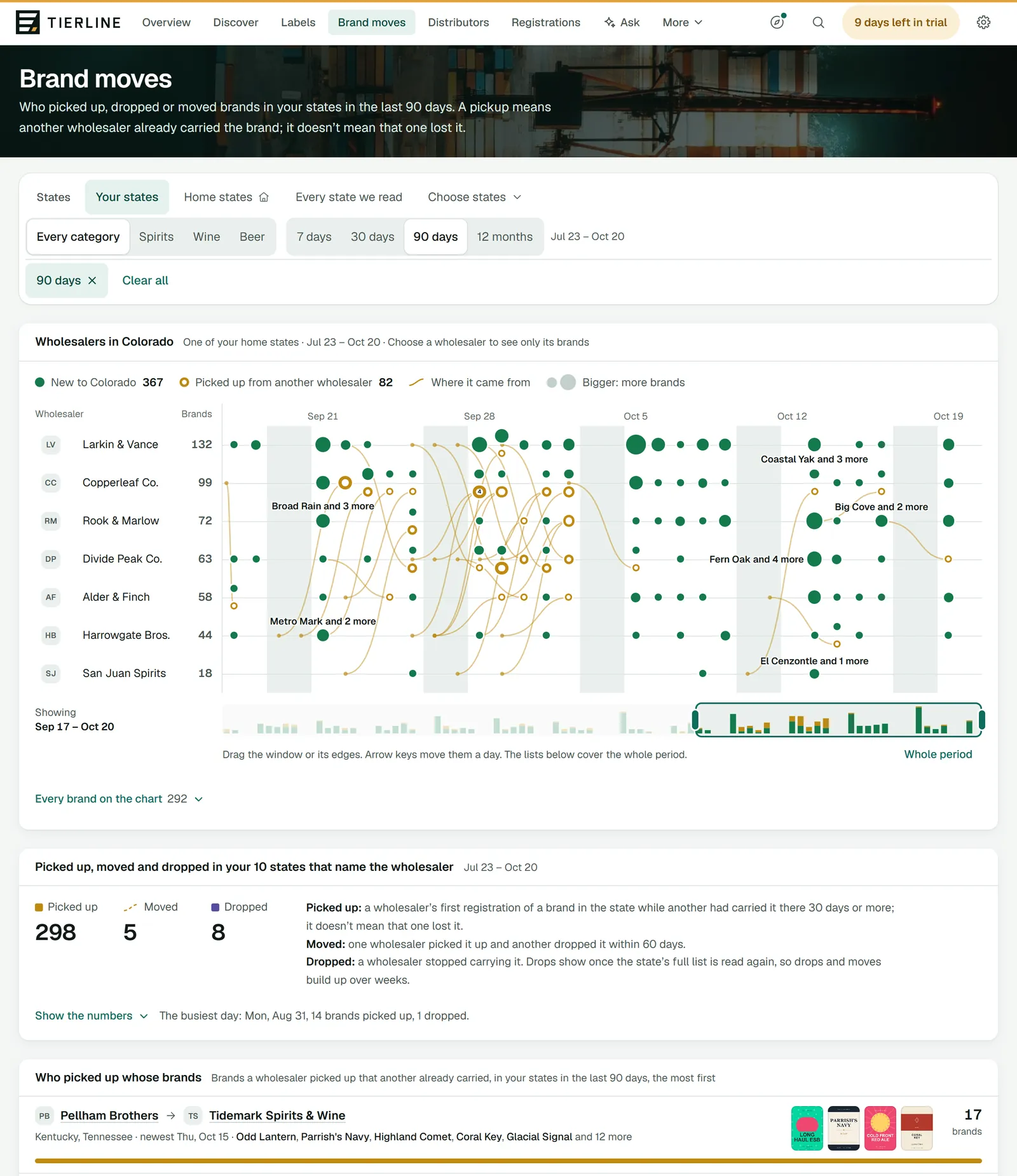
How to read it
- 1.
The filter bar, as on every page: Your states, Every state we read, or the states you choose. It offers only the states whose registrations name the wholesaler, the only ones with brand moves, and says which of yours don’t. Then the category, and the period (7, 30 or 90 days, or 12 months; it opens on 30 days). On a phone they fold behind Filters.
- 2.
The chart: one state’s wholesalers, the one you chose, else your first home state among the states chosen, else the busiest of them. A filled green dot is brands new to the state; a gold ring is brands picked up from another wholesaler, with a gold curve from that wholesaler’s lane (dashed when the brand moved). The key above it gives that state’s numbers, with moves counted apart from pickups. Bigger dots hold more brands; over 12 months a column is a week.
- 3.
A lane for each wholesaler, the busiest first, with how many brands it took on. Choose a name to see only its brands and where they came from. Point at a dot, or tap it, to see its brands.
- 4.
Picked up, moved and dropped in the period. Show the numbers lists them day by day (week by week over 12 months), with who took on the most.
- 5.
Who picked up whose brands: from one wholesaler to another, the most brands first, with their logos and the labels of a few of the brands.
What to do here
See who’s winning brands
Set 30 days and your states, then read Who picked up whose brands. Each wholesaler’s name opens its page, with what it won and lost.
See where a wholesaler’s brands came from
Choose its name in the chart. Show every wholesaler goes back; the link beside it opens the wholesaler’s page.
Good to know
- If your company sells only one category, this page opens on it, with a chip such as Wine only among the filters: press it, or Every category, to see them all.
- A pickup means a wholesaler started carrying a brand another wholesaler in the state had carried for 30 days or more. It doesn’t show that the first one lost it.
- A drop shows once a state’s full list is read again without the wholesaler’s registrations of the brand, so drops, and the moves made of them, build up over weeks of reads.
- Where the period has more days than fit, the chart shows the newest that do, and a slider under it shows the whole period: drag the window, or its edges, or press the strip where you want it. The arrow keys move it a day (a week over 12 months), Page Up and Page Down seven. Whole period shows every day. The numbers and lists below always cover the whole period.
- Under the chart, Every brand on the chart lists every dot: the day, the wholesaler, the brands and where they came from.
- Further down, Every pickup, move and drop lists each one, a line each, ten at first; Show more adds 25 at a time. Several brands from one wholesaler to another within two weeks are one line.